Official Blog
Dashing through the snow...with NORAD, YouTube and Google
Thursday, December 23, 2010
Every Christmas Eve, children all over the world ask themselves—and their parents—questions about Santa’s magical journey. How does Santa visit so many children in one night? Will he eat the cookies I left out? How does he fit all those presents into his sleigh? These childhood mysteries are part of what makes the Santa tradition so special.
There’s one timeless question that we’re proud to say we can help answer: Where in the world is Santa at this very moment? Thanks in part to recent advances in warp-speed GPS technology and some very clever elves (elveneering?)
NORAD Tracks Santa
is once again prepped and ready to go.
Starting tomorrow, December 24 at 2:00 a.m. EST, visit
www.noradsanta.org
to follow Santa as he journeys around the world delivering presents to children in more than 200 countries and territories. There are a few different ways to find the jolly man in his unmistakable red suit over the course of the day, so feel free to track him using any of the following methods:
Subscribe to his YouTube channel:
Santa’s home on YouTube is at
http://www.youtube.com/noradtrackssanta
. That’s where you can find videos from his journey throughout the night. This “Commander's Holiday Message” offers a peek of what to expect:
See Santa on a Google Map:
On your home computer or laptop, visit
www.noradsanta.org
and choose your preferred language. You’ll see a large Google Map on the page displaying Santa’s current location and his next stop. Click the video icons to watch
“Santa Cam” videos
, and click the gift icons to learn more about each city.
Watch Santa fly with the Google Earth Plug-in:
From
www.noradsanta.org
, click on the link
Track Santa in Google Earth
. You'll see Santa steering his sleigh right on the webpage. If you don't have the Google Earth plug-in, you can get ready by
downloading
it ahead of time.
Follow Santa on your phone:
Track Santa from your mobile phone by opening
Google Maps for mobile
and searching for [santa]. Or, visit m.noradsanta.org on your phone’s browser.
Get real-time information about Santa’s location: Use Google’s
Realtime Search
to get updates from social networks, news and micro-blogs like Twitter at
@noradsanta
, and keep up with news about his journey on this
Facebook page
.
For any techie questions you might have, we’ve also put together some helpful
tips and tricks
about all the cool ways you can experience Santa’s journey. And now that you know how to follow Saint Nick on Christmas Eve, it’s our tradition to tell the story of how this all started...
NORAD
(North American Aerospace Defence Command)
first began to track Santa
in 1955 when a misprinted advertisement in a Sears & Roebuck catalogue mistakenly led callers expecting a Santa-hotline to the NORAD commander-in-chief's telephone. Embracing the spirit of the season, NORAD used its satellite and radar capabilities to offer callers sleigh-location updates, and has
tracked Santa's whereabouts
on Christmas Eve ever since. Then in 2004, Google started tracking Santa on Google Earth as a 20% project, which in 2007 grew into a partnership with NORAD, adding the mapping technology of
Google Maps
and
Google Earth
to the NORAD experience. Over the years, other Google teams have also joined in the holiday fun (
YouTube
, Google Voice’s
www.SendACallFromSanta.com
and
Google SketchUp
).
As we approach this year’s Christmas Eve adventure, Santa was able to take a break from the preparations to visit the New York Stock Exchange this past Monday. His helpful elves kept everything at the North Pole on schedule while folks from Google and NORAD attended the Closing Bell ceremony, and stood alongside Santa from Macy’s going over last minute details about tomorrow’s big ride:
Santa with NORAD, Google and members of the Marine Toys for Tots Foundation
that’s me, the tall guy in the back row clapping)
So don’t forget to visit
www.noradsanta.org
tomorrow morning starting at 2:00 a.m. EST when Santa embarks on his flight. From all of us here at Google and YouTube, happy holidays and here’s to a very happy New Year!
Brian McClendon, Original Google Engineering Elf, recently watched “
Picasa 3.8 Face Movie
.”
Celebrating our partners’ success
Wednesday, December 22, 2010
As 2010 draws to a close, it’s time to reflect on another incredible year in online video. During the last 12 months you all watched more than 700 billion YouTube videos, and uploaded more than 13 million hours of content to the site. We met a bunch of new faces (and
fruits
) and celebrated as new YouTube
partners
hit the big time with millions of views. Indeed, our partner program grew to around 15,000 participants worldwide.
We’re privileged to work with the most passionate and talented partners in the world, who produce and upload videos that inspire us, make us laugh and move us -- and, most importantly, change the way we look at the world. In bedrooms, garages and studios across the globe, these talented and entrepreneurial YouTube partners are building the next generation of media companies, and in July this year we announced a new way we’d be supporting this via
Partner Grants
.
It’s clear that we want to see YouTube partners continue to create great video and further push the boundaries of what’s possible online. To that end, today we’re giving a $1,000 credit at
B&H Photo
to 500 partners around the world, who primarily create and distribute their content online, to purchase new video production equipment. This group includes well-known YouTube stars like
ShayCarl
,
MysteryGuitarMan
and
FreddieW
(and this past weekend we learned the latter two make quite a
guitar-bass duo
), and also successful musicians like
Kina Grannis
and promising new talents like
EmilyNoel83
, who was the inaugural winner of our
“On The Rise” program
last month. Collectively, these 500 partners generated billions of video views in 2010, and we chose them to receive a $1,000 credit based on their popularity during 2010, as well as their online focus.
We hope this will provide our most popular partners with the tools they need -- whether it be a new camera, sound & lighting equipment or editing software -- to produce even higher quality videos and ultimately drive bigger audiences to their work. Hundreds of creative people all around the world have launched professional careers after using YouTube as a global platform to demonstrate their talent - we want to see this number continue to grow.
On behalf of the entire YouTube community, we thank these partners for sharing their creativity and talent with us, and we look forward to what’s to come in 2011 and beyond.
Tom Pickett, Director of Content Operations & Online Creators, recently watched “
P4A: The Annoying Orange Interviewed by Tay Zonday
.”
It’s all about practice
Tuesday, December 21, 2010
Welcome to the final post in Howcast’s Modern 101 for Emerging Digital Filmmakers. On Friday, October 1, we kicked off our series with
Embracing exploration: being a filmmaker today
and today we’re wrapping up with a video co-produced with
Tribeca Flashpoint Academy
,
How has the web changed film school
?
Over the course of our series, we
shared breakfast with
our
Howcast Emerging Filmmakers
and learned instant gratification is a huge benefit to being a web filmmaker; we offered up a
digital roadmap
for filmmakers;
sat in
on
Shooting People’s
Ingrid Kopp’s Digital Bootcamp; talked with some producers about
how the web is changing film festivals
; and
outlined
one filmmaker’s plan of attack for distributing and promoting his short documentary. (Plus,
lots
more!)
We felt it was fitting to end up at the beginning of a film career -- talking to current film students and professors about how the web complements a formal film education and how web filmmaking will fit into students’ careers after graduation.
As the students at Tribeca Flashpoint Academy explain in their video, they watch hundreds of hours of web video each week and they upload regularly. The web is giving them a chance to learn how audiences respond to their ideas and their professors see it as a viable venue for quality work. This is exciting news for filmmakers everywhere. Whether you’re in school or not, the web’s vast network of videos, collaborators, and viewers is reachable within minutes.
There has always been one thing about film school that can’t really be summed up in a course catalogue and a filmmaker can’t get working in a vacuum, and that’s the chance to fine tune your craft amongst other young creators and veteran professionals. Create, share, get feedback, create again. It’s all about practice. This chance to practice was really only previously available to a small few with the resources to access equipment and education. Thanks to technology, today a filmmaker anywhere -- in film school, in high school, or even a hobbyist -- can see an innovative video, be inspired to make their own, upload, and get insight from a worldwide community of filmmakers. To me, that’s been the most important lesson we shared in our blog series.
Happy holidays and happy shooting!
Heather Menicucci, Director,
Howcast Filmmakers Program
, recently watched “
I Hope This Gets To You
”.
What makes an ad worth spreading?
Tuesday, December 21, 2010
Today we bring you a guest post from Chris Anderson, Curator of TED, a nonprofit devoted to Ideas Worth Spreading from three worlds: Technology, Entertainment, Design. Anderson explains how TED and YouTube are teaming up to present a challenge called 'Ads Worth Spreading'.
Video is a powerful medium for spreading ideas. Over the past four years, TED has posted over 800 TEDTalks on
TED.com
and
on YouTube
. We've been thrilled to see the world respond -- watching the videos more than 375 million times.
Our mission -- of spreading ideas around the world -- is supported in part by advertising. And we believe that advertising should evoke the same emotions a TEDTalk does -- it should make you think, make you respond, make you want to share -- a great idea, a product that makes the world better, an initiative that might change the world. Like YouTube, we want to see the same level of passion in online ads as we do in our TEDTalks. So, we’ve created a challenge called '
Ads Worth Spreading
' to solicit the best ads that raise the bar, elevate the craft and invent new forms of online engagement.
We invite you to
enter the competition
. Entries can be hysterically funny, stunningly beautiful, or just intriguing, fascinating, ingenious and persuasive. For inspiration, check out examples of great creative on
YouTube Show and Tell
. It is free to enter, the submission deadline is February 7, 2011, and full contest rules are
right here
.
We’re excited to see your ads worth spreading!
Chris Anderson, TED Curator, recently watched "
Rory Sutherland: Life lessons from an ad man
."
Introducing YouTube Trends
Monday, December 20, 2010
With 35 hours of video now being uploaded to YouTube every minute, keeping up with the latest goings-on around here can be a challenge.
Last week, we officially unveiled YouTube Trends (
youtube.com/trends
), a new set of tools designed to help you stay on top of the latest popular videos and trends on the world's largest video site.
Here's more of an explanation:
YouTube Trends features new algorithmically-generated feeds that highlight which topics and videos are trending right now. The site also offers a ‘top videos’ module and a blog with more in-depth explorations of videos, trends, news, and cultural phenomena as seen through the lens of YouTube. We've also created a
Trends Dashboard
that lets you quickly explore what's popular in different cities in the U.S. and around the world, as well as within specific demographic groups.
Last Monday, we started a 12-day countdown to the holidays exploring the
top videos
from 2010. So far, we've posted lists of the top videos in:
Sports
Movie Trailers
News and Politics
Parodies
Tech Culture
Hip-Hop Music
Vehicles
Non-Profits and Activism
Animals
We've also examined
extreme winter weather footage
from across North America, looked at
how Justin Bieber's "Baby"
got so big,
tracked "Double Rainbow's"
popularity, seen how the
same practical joke
traveled across seven different countries, and settled the age-old question:
dogs or cats
?
YouTube Trends
is like your water cooler for web video, so check back each day to see the very latest.
For more specific info about YouTube Trends, visit
our FAQ
or watch a
video walk-through
.
Kevin Allocca, YouTube Trends Manager, recently watched "
So Long To Ya, 2010 | The Jib-Jab 2010 Year in Review
!"
Live 'Project for Awesome' show premiering on YouTube today
Saturday, December 18, 2010
Day one of
Project for Awesome
was a huge success, thanks to you! So many videos have been created and shared with the world. If you haven't already, we encourage you to
create and upload a video
promoting your favorite cause or charity.
To celebrate the finale of Project for Awesome, join us for a live show from 4 - 7pm PST at
www.youtube.com/p4a
. YouTube's biggest stars and some of the world's leading nonprofit organizations will team up to promote important causes in education, health, poverty, children's wish giving and more -- through a wide array of entertaining moments and stories.
We look forward to your participation!
Christopher Hamilton and Bing Chen, Product Marketing Managers, recently watched "
Project for Awesome! P4A! charity : water
".
Context Is King
Friday, December 17, 2010
Because YouTube is a platform for free expression of all sorts, we take great care when we enforce our
Community Guidelines
. We try to allow as much content as possible on the site and still ensure that the rules are followed. It is a delicate balancing act, and we depend on our uploaders to help.
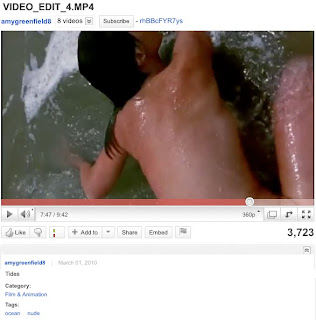
Let us explain. Check out the two videos below. Notice anything different between them? Same content, right? Not quite.
Video #1
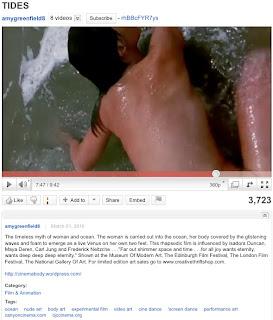
Video #2
While the difference may appear insignificant, the
context
of the two videos is very different. In this case, the first video provides very little information, or context, about what the video is about, while the second video is much more instructive. Why does this matter? Because the video alone doesn’t always tell the whole story. A video’s title, description and tags are critical in how we apply our Community Guidelines.
It’s a balancing act.
As you can see in the video examples above, it’s difficult to understand the intention of the uploader without the proper context. Why does understanding the intention of the uploader important? Well, generally speaking, nudity or graphic content is not allowed on YouTube. However, we do have exceptions for educational, documentary, scientific, and artistic content. In order for us to determine whether an exception applies, we need your help. The more information you provide, the clearer your intentions will be.
Give as much context as possible.
Your video’s title, description and tags are a great way to provide context to your videos. When our team reviews flagged content, titles or tags like “performance art piece" or "street riot in Jakarta" helps us understand the context of the material you're uploading.
Here are some tips on how to surround your videos with as much context as possible:
Provide an informative, relevant title.
Try to add some specific information into the description: who is in the video, what is happening, where and when did it happen, and why.
If you have a website (or know of one) that provides more detail about the content, such as a related news story or artist statement, feel free to direct viewers to it.
Think about your audience. What are you trying to accomplish through your content? Help inform and educate the viewer.
You can also add detail directly onto the video itself, using our
annotations tool
.
Even if you’re uploading from your phone, we ask that you try to provide as much context as possible.
But remember, there’s still a line.
Keep in mind that certain content is still not okay. Don’t post footage that is highly focused on nudity or graphic content, or create montages from otherwise acceptable sources to supplant its original intent. Don’t try to circumvent your way around our
Community Guidelines
or look for loopholes.
Everyone makes mistakes.
If your content is removed from the site and you feel it was in error, you have the ability to appeal the decision. To learn more about the appeal process, check out
this page
in our Help Center. And remember, context is king. The more detail you provide viewers upfront, the more likely everyone will understand your intent and the less likely it could be removed.
We hope this post gives you more insight into how we review content on YouTube. Our mission is to empower our users to share, educate, entertain and inform. Help us help you in that goal.
Amy Wright, Policy Specialist, recently watched "
WILDFIRE (Segment)
."
Labels
3D
4k
accessibility
account info
activism
ads
africa
annotations
arts
awards
benefit
betas
bizblog
blogs
bulletins
buzz
captions
celebrity playlists
channels
chrome
citizen journalism
citizen reporting
citizentube
comedy
comments
community
community guidelines
contests
creator's corner
creators
curators
customization
dance
design
discovery
doodle
editor
education
embeds
entertainment
events
facebook
film
flagging
gaming
gmail
google
google tv
government
grants
groups
guidelines
hd
help center
holidays
homepage
howto
inspiration
investment
jobs
journalism
life in a day
live stream
marketing
meetups
mobile
moderator
movies
music
musicians wanted
news
nonprofits
open-source
partners
playlists
policy
politics
privacy
product update
quicklist
ratings
rentals
research
safety
science and technology
screening room
search
sharing
shows
social networks
sports
staff
stats and data
store
subscriptions
tags
test tube
travel
trends
tv
twitter
upload
vevo
video editing
video production
video volunteers
viral video
youtube api
youtube direct
Archive
2020
Jul
Jun
May
Apr
Mar
Feb
Jan
2019
Dec
Nov
Oct
Sep
Aug
Jul
Jun
May
Apr
Mar
Feb
Jan
2018
Dec
Nov
Oct
Sep
Aug
Jul
Jun
May
Apr
Mar
Feb
Jan
2017
Dec
Nov
Oct
Sep
Aug
Jul
Jun
May
Apr
Mar
Feb
Jan
2016
Dec
Nov
Oct
Sep
Aug
Jul
Jun
May
Apr
Mar
Feb
Jan
2015
Dec
Nov
Oct
Sep
Aug
Jul
Jun
May
Apr
Mar
Feb
Jan
2014
Dec
Nov
Oct
Sep
Aug
Jul
Jun
May
Apr
Mar
Feb
Jan
2013
Dec
Nov
Oct
Sep
Aug
Jul
Jun
May
Apr
Mar
Feb
Jan
2012
Dec
Nov
Oct
Sep
Aug
Jul
Jun
May
Apr
Mar
Feb
Jan
2011
Dec
Nov
Oct
Sep
Aug
Jul
Jun
May
Apr
Mar
Feb
Jan
2010
Dec
Nov
Oct
Sep
Aug
Jul
Jun
May
Apr
Mar
Feb
Jan
2009
Dec
Nov
Oct
Sep
Aug
Jul
Jun
May
Apr
Mar
Feb
Jan
2008
Dec
Nov
Oct
Sep
Aug
Jul
Jun
May
Apr
Mar
Feb
Jan
2007
Dec
Nov
Oct
Sep
Aug
Jul
Jun
May
Apr
Mar
Feb
Jan
2006
Dec
Nov
Oct
Sep
Aug
Jul
Jun
May
Apr
Mar
Feb
Jan
2005
Dec
Nov
Oct
Sep
Aug
Jul
Feed
Follow @youtube
Follow
Learn more in the
YouTube Help Center
.



 Follow