Official Blog
YouTube Release Notes: More ways to communicate
Thursday, February 16, 2012
You keep
adding
and
watching
more videos, so we’re working to keep adding more ways for you to watch, share and enjoy the channels and videos on
YouTube
. This week in
Release Notes
we’ve got a new way to promote your Google+ profile on YouTube, more options in the Annotations Editor, posting to your Channel Feed and more.
Google+ profile on YouTube channel
Want to share your Google+ profile or Google+ Page on your YouTube channel? We’ve added a feature to let you promote your presence on G+. We’re looking for other ways to bring the benefits of Google+ to your YouTube channel, so as always please give us your feedback!
Post videos, playlists to your own feed
You can now share videos and playlists in your
Channel Feed
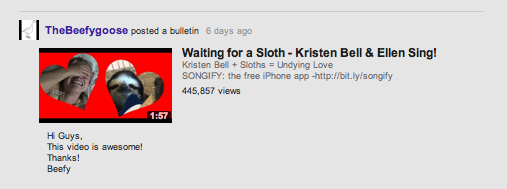
by posting a Channel Bulletin. When you’re on your Feed tab you’ll see a box “Post to Feed,” where you can enter a comment and add a link to share a video or a playlist. When you’ve posted the bulletin, it will show up in your Channel Feed with your comment below the video. Viewers who are subscribed to your channel will be notified when you post to your feed in their homepage feed.
Homepage and Channel Feeds
After experiments and lots of your feedback, we’re releasing an update to how events are displayed in the feed. The update focuses on three main changes: (1) the video title is more prominent for upload and sharing events, (2) aggregated events now feature a “+more” button which will bring more attention to the event than the previously smaller notification and (3) adding videos to a playlist has a new cleaner styling.
Before: After:
Annotations
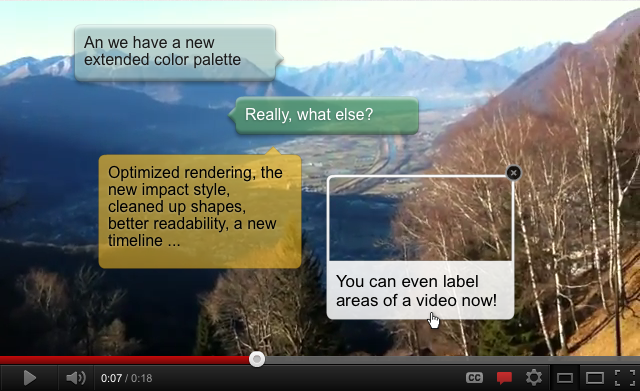
Customizing your videos is easier with our new annotations features. We’ve been adding more options to the
Annotations Editor
like a new annotation type, a full color palette and a new timeline. We’ve also added annotation styles, which lets you choose a templated design to apply to your videos. You can quickly pick a design for your annotation and apply it your video. Start using these today in the Editor by clicking the arrow next to any upload in the Video Manager.
The YouTube Team recently watched, “
KevJumba vs. NY Yankee Nick Swisher Ping Pong FaceOFF
.”
YouTube Release Notes: Updates to Browse page, Video Editor and Video Manager
Thursday, January 26, 2012
This week we’re kicking off our recurring
Release Notes
post for 2012, highlighting some of the most recent updates to
YouTube
. Our scrappy engineers have been hard at work to make your experience even better, and here’s what’s new.
New look for Browse
Today we're giving the
Browse
page a fresh look-and-feel, to help you find even more great Channels on YouTube. Alongside the top lists like Most Viewed Today, you can now discover and subscribe to more YouTube Channels on browse pages, which will then regularly update on your homepage. You can also discover more content under categories including Entertainment, People & Blogs, Science & Technology and more. You’ll find it all on
YouTube.com/browse
.
Video Editor with new features
We first
announced
the YouTube Video Editor back in June of 2010 and since then we’ve added dozens of features that we hope you’ve enjoyed. With the recent
YouTube homepage update
we felt it was time to give the Video Editor a visual overhaul, as well as adding a cool new timeline, easier clip trimming and a moving playhead. Head over to
YouTube.com/editor
to see the changes. Here’s a shot of what it looks like:
Video Manager with oldies and new goodies
We’ve listened to your feedback from the
Video Manager
update
in December, and have a bunch of new features and improvements. Along with a visual update, the Video Manager includes search history, and an improved display of scheduled uploads and claimed videos. You also wanted us to add back in the likes and dislikes statistics as well as sorting videos by popularity, so those features have returned. This will be rolling out over the next few days, and here’s a screenshot of what it looks like:
David Wang, product specialist, recently watched “
Somebody That I Used to Know - Walk off the Earth (Gotye - Cover)
,” Alan deLespinasse, software engineer, recently watched “
Extreme Sheep LED Art [HQ]
,” and Jung Kim, User Experience Designer, recently watched “
[M/V] ITAEWON FREEDOM (with J.Y. Park)
.”
Release Notes: Community-designed Doodle, global Halloween films, easier bug reporting, virtual keyboard...
Saturday, October 30, 2010
With it being Halloween season and all, we've got an especially spoooooky edition of Release Notes for you.
First-ever user-designed Doodle:
You may have noticed that once in a while, we change our homepage logo to match a special occasion -- for example, we've done it for Earth Day, the finale of YouTube Play, and yesterday's one billionth subscription milestone. But this Halloween we're especially jazzed because the Doodle you'll see on the homepage was designed by
xperpetualmotion
, a YouTube community member and Rhode Island School of Design student. Here's how she came up with the icon you see below: "I tried out a lot of different Halloween imagery before deciding on the classic 'holes cut out of a white sheet' ghost. It makes me smile every time, because what else could this kid possibly have under there that makes him that shape? I wanted the logo to be something fun and clever, and I hope everyone loves it as much as I do!" We certainly do! Thank you, Karen.
YouTube's first user-designed Doodle, by xperpetualmotion
Global Halloween films:
If you're in the U.S., U.K., Canada or Australia, we've got some exciting news to add to your seasonal mirth: our friends at
Crackle
made sure their Halloween offerings could be viewed by horror fans around the world, marking the first time a studio's made several full-length movies simultaneously available in multiple territories on YouTube. Click
here
for regional viewing dates for
Underworld: Evolution
,
Idle Hands
,
Mary Reilly
,
The Blob
and
The Bride
.
Report a bug:
No, we don't mean the creepy crawly kind, but the kind that may indicate something's broken. If you come across a problem on the site, scroll down to the new "report a bug" link at the bottom of any YouTube page. Clicking it will allow you to take an easy screenshot of the page and add further details in the pop-up box:
New "Send feedback" form
African language launches:
YouTube's now available in Amharic and Swahili. Click on the language link at the bottom of the page to change your language settings.
Type non-English text with the virtual keyboard:
We've made it easy for people to find videos in non-Latin script-based languages; the on-screen keyboard is available in 26 languages (Amharic, Arabic, Bulgarian, Croatian, Czech, Danish, Dutch, Filipino, Finnish, Greek, Hebrew, Hindi, Korean, Lithuanian, Norwegian, Polish, Portuguese, Russian, Serbian, Slovak, Swahili, Swedish, Vietnamese, Slovenian, Romanian, Ukrainian). To use the virtual keyboard, switch the language of the site to one of the supported languages and click on the keyboard icon in the search box.
Here's where you can turn on the virtual keyboard
More efficient 3D player:
Our new player for 3D videos is much faster than the previous player, especially for HD resolution. Try enjoying
your favorite 3D clips
in high resolution and full screen with no lag.
The BooooooTube Team
UPDATE (8pm PT):
We just received this video from Karen, to go along with her Doodle:
Labels
3D
4k
accessibility
account info
activism
ads
africa
annotations
arts
awards
benefit
betas
bizblog
blogs
bulletins
buzz
captions
celebrity playlists
channels
chrome
citizen journalism
citizen reporting
citizentube
comedy
comments
community
community guidelines
contests
creator's corner
creators
curators
customization
dance
design
discovery
doodle
editor
education
embeds
entertainment
events
facebook
film
flagging
gaming
gmail
google
google tv
government
grants
groups
guidelines
hd
help center
holidays
homepage
howto
inspiration
investment
jobs
journalism
life in a day
live stream
marketing
meetups
mobile
moderator
movies
music
musicians wanted
news
nonprofits
open-source
partners
playlists
policy
politics
privacy
product update
quicklist
ratings
rentals
research
safety
science and technology
screening room
search
sharing
shows
social networks
sports
staff
stats and data
store
subscriptions
tags
test tube
travel
trends
tv
twitter
upload
vevo
video editing
video production
video volunteers
viral video
youtube api
youtube direct
Archive
2020
Jul
Jun
May
Apr
Mar
Feb
Jan
2019
Dec
Nov
Oct
Sep
Aug
Jul
Jun
May
Apr
Mar
Feb
Jan
2018
Dec
Nov
Oct
Sep
Aug
Jul
Jun
May
Apr
Mar
Feb
Jan
2017
Dec
Nov
Oct
Sep
Aug
Jul
Jun
May
Apr
Mar
Feb
Jan
2016
Dec
Nov
Oct
Sep
Aug
Jul
Jun
May
Apr
Mar
Feb
Jan
2015
Dec
Nov
Oct
Sep
Aug
Jul
Jun
May
Apr
Mar
Feb
Jan
2014
Dec
Nov
Oct
Sep
Aug
Jul
Jun
May
Apr
Mar
Feb
Jan
2013
Dec
Nov
Oct
Sep
Aug
Jul
Jun
May
Apr
Mar
Feb
Jan
2012
Dec
Nov
Oct
Sep
Aug
Jul
Jun
May
Apr
Mar
Feb
Jan
2011
Dec
Nov
Oct
Sep
Aug
Jul
Jun
May
Apr
Mar
Feb
Jan
2010
Dec
Nov
Oct
Sep
Aug
Jul
Jun
May
Apr
Mar
Feb
Jan
2009
Dec
Nov
Oct
Sep
Aug
Jul
Jun
May
Apr
Mar
Feb
Jan
2008
Dec
Nov
Oct
Sep
Aug
Jul
Jun
May
Apr
Mar
Feb
Jan
2007
Dec
Nov
Oct
Sep
Aug
Jul
Jun
May
Apr
Mar
Feb
Jan
2006
Dec
Nov
Oct
Sep
Aug
Jul
Jun
May
Apr
Mar
Feb
Jan
2005
Dec
Nov
Oct
Sep
Aug
Jul
Feed
Follow @youtube
Follow
Learn more in the
YouTube Help Center
.






 Follow