Official Blog
Looking ahead in the YouTube player
Tuesday, March 6, 2012
Pssst!
We’ve got a surprise — we want to give you a sneak peek to videos on YouTube.
Years ago we created a way to link to a
certain moment
on a video, which let you find, share and comment on just your favorite parts. Now we’re expanding that control even more.
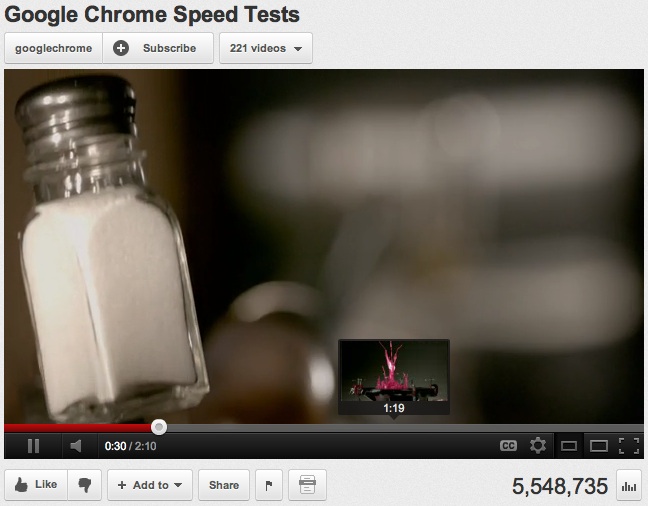
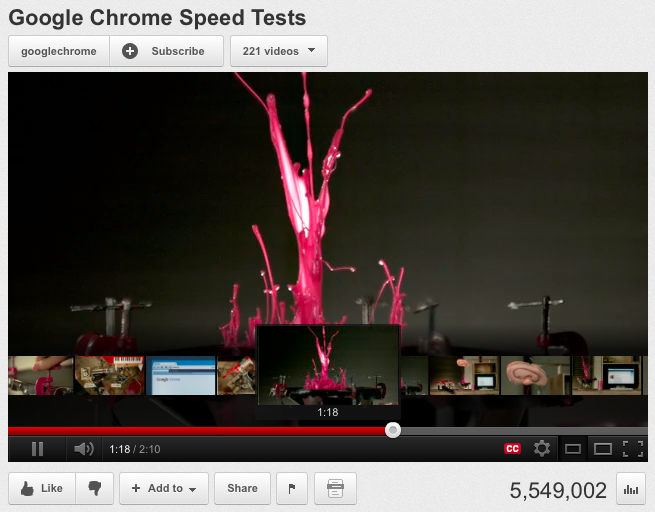
Over the coming weeks, you’ll be able to see an image preview or a series of thumbnails with three new features on our video player.
So whether you’re sneaking a peek ahead, scanning backwards, or using a thumbnail to find where you stopped watching a video, you’ll soon have three options to instantly look through YouTube videos. Here’s how each works:
Taking a sneak peek
So excited (or maybe so scared) that you want to find what happens later in the video? Hover your mouse over the seek bar and a thumbnail of that moment will appear, and you can click to start watching from that moment.
Scanning through thumbnails
Let’s say you started a video but had to come back and finish it later. You thought you were the middle of the video when main character looks dramatically into the camera, or maybe it was the shocking look from the supporting character a few seconds ago. Now you can drag the handle along the seek bar to show a filmstrip of thumbnails of previous and upcoming scenes.
Zooming in on long videos
If you’re watching a video that’s longer than 90 minutes, like one of the growing list of
movies on YouTube
, you’ll see an added feature that lets you zoom in on the seek bar, one and a half minutes at a time. This second bar that appears gives you more granularity for finding that exact moment you want on a long video. Check out
Life in a Day
to see how it works.
With
an hour of video
uploaded to YouTube every second, we’ve got a lot of sneak peeks to get ready on YouTube, and not every video will have this feature available at launch. Let us know what you think as you start seeing these features around the site.
Nundu Janakiram, product manager, recently watched “
Brush With Death
.”
Thumbnails: Your video’s billboard on YouTube
Wednesday, December 21, 2011
This is part of an ongoing series sharing tips from the
YouTube Creator Playbook
, a resource of best practices and tips you can start using on your channel and videos right away. As we move along in this series, some posts will be focused for more advanced YouTubers or YouTube Partners, like this week’s tip.
With YouTube seeing 48 hours of video uploaded every minute, it’s important to think how you can get your content seen by your regular and new viewers. In many cases, thumbnails are the first point of contact for your channel and a relevant thumbnail can make the difference for someone about to watch your (awesome) content.
Thumbnail Basics
During the upload process you have the opportunity to pick one of three frames from your video, or to upload a custom image file. For either option some basic best-practices can be applied:
1. Your thumbnail should look good, either scaled small or large
Faces work better and engage the audience
Visuals of the finished product work better than the process (e.g. show the cake, rather a picture of the batter)
Good thumbnails follow the same rule as good photographs - composition, contrast, and color count
Average Betty
(food)
2. Choose images that accurately portray your video’s content
Accurate thumbnails allow viewers to more easily browser and enjoy your content.
Misleading thumbnails lead to poor audience engagement and will hurt your channel’s performance in the long run
Safeguards are in place to find and penalize channels that upload racy thumbnails—take a look at our
Community Guidelines
for more information
TMZ
(entertainment)
3. For channels with the ability to upload custom thumbnails, upload a high quality image
There is no limit on pixel size (though 1280x720 is recommended)
The image file has to be less than 2MB
Accepted file formats: PNG, BMP, GIF, or JPEG
vsauce
(multiple genres)
Thumbnail Placement
Thumbnails for your videos, playlists and even your channel are used throughout YouTube to promote your content. Some common placements for thumbnails are in search results, along the far right column of your video’s Watch Page, on your Channel page, and in the video player after a video stops playing (the video’s end card). Through these placements viewers can discover your videos, playlists, and channels.
You also should try
YouTube Analytics
to understand and measure the impact of these tips, and to learn more about thumbnail optimizations and other tips, check out the
YouTube Creator Playbook
.
Andres Palmiter, Audience Development Strategist, recently watched “
Todd Kuiken: A prosthetic arm that ‘feels’
.”
Labels
3D
4k
accessibility
account info
activism
ads
africa
annotations
arts
awards
benefit
betas
bizblog
blogs
bulletins
buzz
captions
celebrity playlists
channels
chrome
citizen journalism
citizen reporting
citizentube
comedy
comments
community
community guidelines
contests
creator's corner
creators
curators
customization
dance
design
discovery
doodle
editor
education
embeds
entertainment
events
facebook
film
flagging
gaming
gmail
google
google tv
government
grants
groups
guidelines
hd
help center
holidays
homepage
howto
inspiration
investment
jobs
journalism
life in a day
live stream
marketing
meetups
mobile
moderator
movies
music
musicians wanted
news
nonprofits
open-source
partners
playlists
policy
politics
privacy
product update
quicklist
ratings
rentals
research
safety
science and technology
screening room
search
sharing
shows
social networks
sports
staff
stats and data
store
subscriptions
tags
test tube
travel
trends
tv
twitter
upload
vevo
video editing
video production
video volunteers
viral video
youtube api
youtube direct
Archive
2020
Jul
Jun
May
Apr
Mar
Feb
Jan
2019
Dec
Nov
Oct
Sep
Aug
Jul
Jun
May
Apr
Mar
Feb
Jan
2018
Dec
Nov
Oct
Sep
Aug
Jul
Jun
May
Apr
Mar
Feb
Jan
2017
Dec
Nov
Oct
Sep
Aug
Jul
Jun
May
Apr
Mar
Feb
Jan
2016
Dec
Nov
Oct
Sep
Aug
Jul
Jun
May
Apr
Mar
Feb
Jan
2015
Dec
Nov
Oct
Sep
Aug
Jul
Jun
May
Apr
Mar
Feb
Jan
2014
Dec
Nov
Oct
Sep
Aug
Jul
Jun
May
Apr
Mar
Feb
Jan
2013
Dec
Nov
Oct
Sep
Aug
Jul
Jun
May
Apr
Mar
Feb
Jan
2012
Dec
Nov
Oct
Sep
Aug
Jul
Jun
May
Apr
Mar
Feb
Jan
2011
Dec
Nov
Oct
Sep
Aug
Jul
Jun
May
Apr
Mar
Feb
Jan
2010
Dec
Nov
Oct
Sep
Aug
Jul
Jun
May
Apr
Mar
Feb
Jan
2009
Dec
Nov
Oct
Sep
Aug
Jul
Jun
May
Apr
Mar
Feb
Jan
2008
Dec
Nov
Oct
Sep
Aug
Jul
Jun
May
Apr
Mar
Feb
Jan
2007
Dec
Nov
Oct
Sep
Aug
Jul
Jun
May
Apr
Mar
Feb
Jan
2006
Dec
Nov
Oct
Sep
Aug
Jul
Jun
May
Apr
Mar
Feb
Jan
2005
Dec
Nov
Oct
Sep
Aug
Jul
Feed
Follow @youtube
Follow
Learn more in the
YouTube Help Center
.




 Follow